SV0 Skills: Shared Skills Architecture
Status: Implemented (2026-03-09)
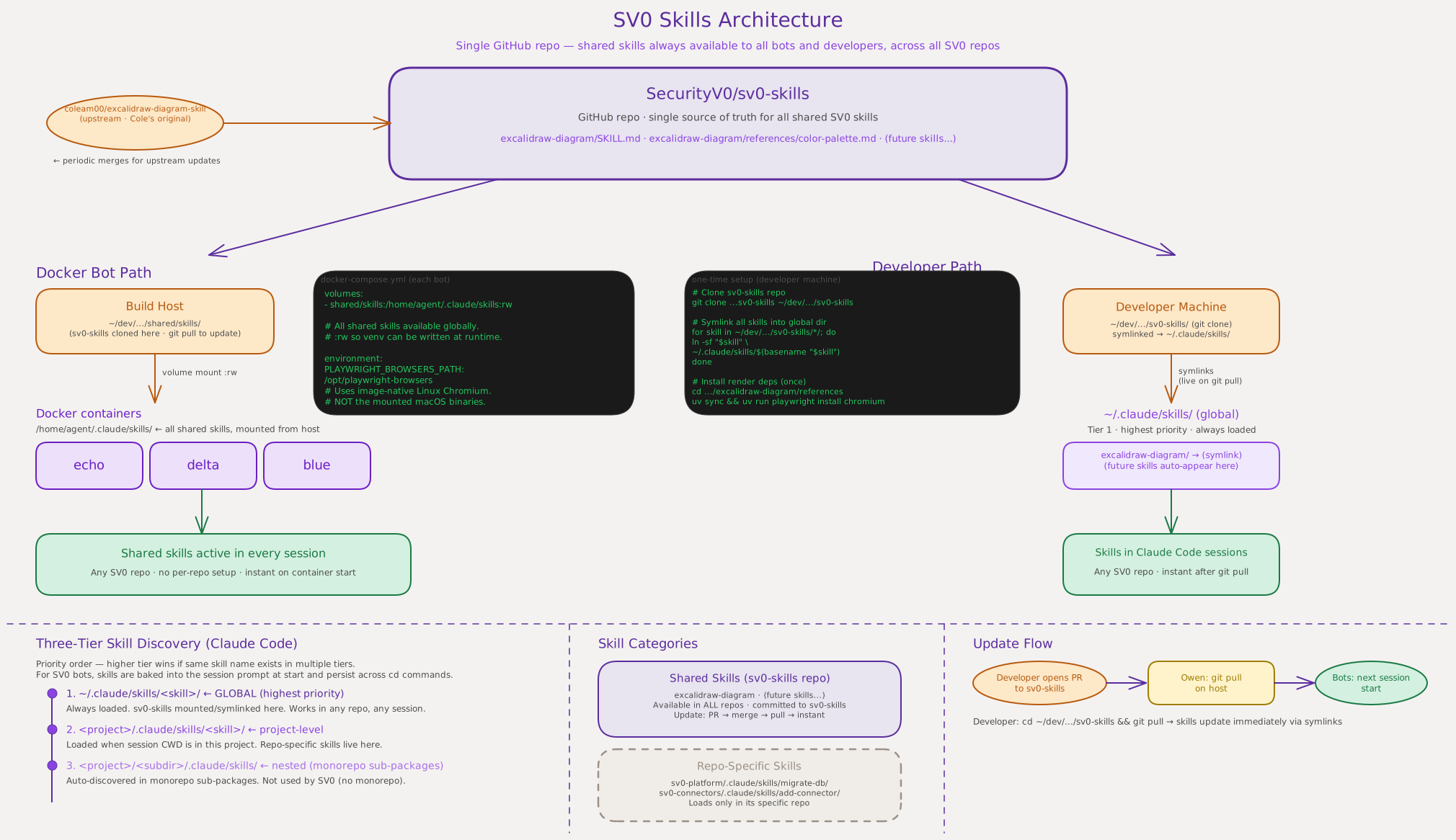
Overview
SecurityV0 has multiple independent repos (sv0-platform, sv0-connectors, sv0-documentation, sv0-website). Skills that are useful across all repos live in a single source of truth: SecurityV0/sv0-skills. This eliminates duplication and version drift.
Skill Categories
| Category | Location | Examples |
|---|---|---|
| Shared | sv0-skills repo, globally available | excalidraw-diagram, review-pr, track |
| Repo-specific | .claude/skills/ inside each repo | deploy, deploy-dev, review-ui, sync-notion |
Rule of Thumb: Where Does a Skill Belong?
In sv0-skills (shared) — if it provides a capability useful in any SV0 repo:
- No hardcoded paths, server IPs, or repo-specific config
- Would be equally useful in sv0-platform, sv0-connectors, sv0-documentation, sv0-website
- Examples:
excalidraw-diagram(diagrams),review-pr(PR review),track(GitHub Issue management)
In the repo it serves (.claude/skills/) — if it encodes a workflow specific to that repo:
- References server IPs, deployment targets, specific config file paths, or project-specific Notion IDs
- Only makes sense when working in that one repo
- Examples:
deploy(Hetzner server IP hardcoded),sync-notion(sv0-documentation's Notion page IDs and mkdocs.yml layout)
When in doubt: if you'd want it available while working in any SV0 repo, it goes in sv0-skills.
Developer Setup
Prerequisites
You need uv (Python package manager) for skills that have a render pipeline:
# macOS
brew install uv

# Linux / other
curl -LsSf https://astral.sh/uv/install.sh | sh
1. Clone sv0-skills
Clone it wherever you keep your SV0 repos — the path is up to you:
git clone https://github.com/SecurityV0/sv0-skills.git ~/dev/sv0-skills
Note: If you clone to a different path, replace
~/dev/sv0-skillswith your path in every command below.
2. Symlink all skills into Claude Code's global skill directory
mkdir -p ~/.claude/skills

for skill in ~/dev/sv0-skills/*/; do
  ln -sf "$skill" ~/.claude/skills/$(basename "$skill")
done
This creates symlinks in ~/.claude/skills/ pointing back to your clone. Claude Code discovers ~/.claude/skills/ at session start in every project — no further configuration needed.
Re-run this loop whenever new skills are added (after a git pull). Existing symlinks are overwritten safely with -f.
3. Install skill dependencies
Skills with a render pipeline need their own Python dependencies and browser binaries. Run once per skill:
# excalidraw-diagram
cd ~/dev/sv0-skills/excalidraw-diagram/references
uv sync
PLAYWRIGHT_BROWSERS_PATH=.playwright-browsers uv run playwright install chromium
Only skills that include
references/pyproject.tomlneed this step.
Verify the setup
Open any SV0 repo in Claude Code and type /skills — you should see excalidraw-diagram (and any other skills from sv0-skills) listed as available.
Staying Up to Date
cd ~/dev/sv0-skills && git pull origin main
Your symlinks stay valid — updated skill files are picked up automatically in your next Claude Code session.
Adding a New Shared Skill
- Add your skill directory to
sv0-skillsvia PR - After merge,
git pullon your machine - Re-run the symlink loop (step 2 above)
- Install any new dependencies the skill needs (step 3 pattern)
Three-Tier Claude Code Discovery
Claude Code loads skills at session start in priority order (highest first):
~/.claude/skills/<skill>/— global, always loaded in any project<project>/.claude/skills/<skill>/— project-level, loaded in that repo<project>/<subdir>/.claude/skills/— nested, for monorepo sub-packages
Shared skills mount at tier 1, so they are always available regardless of which repo you are working in. Repo-specific skills at tier 2 coexist with them — no conflict.
Upstream Tracking
sv0-skills/excalidraw-diagram tracks upstream from coleam00/excalidraw-diagram-skill. To merge upstream improvements:
cd ~/dev/sv0-skills
git remote add upstream https://github.com/coleam00/excalidraw-diagram-skill.git  # one-time
git fetch upstream && git merge upstream/main --allow-unrelated-histories
# Resolve any conflicts in references/color-palette.md (SV0-specific customization)
git push origin main
Docker Bots
The bot containers get sv0-skills via a volume mount — no developer steps needed. The mount point is the same global directory: /home/agent/.claude/skills/. See the compose files for configuration details.