March Sprint Implementation Plan
SUPERSEDED — This plan was written before Sergey's feedback (2026-03-16) and contains decisions that were later overridden. It contradicts Sergey's decisions in at least 3 places (Phase 0.3: says "invert scores" — should be "remove"; Phase 1.2: says "A/B/C grades" — should be "plain English labels"; Phase 4.3: includes effort estimates — dropped by Sergey). Use the Consolidated Action Plan as the single source of truth.
Visual Overview
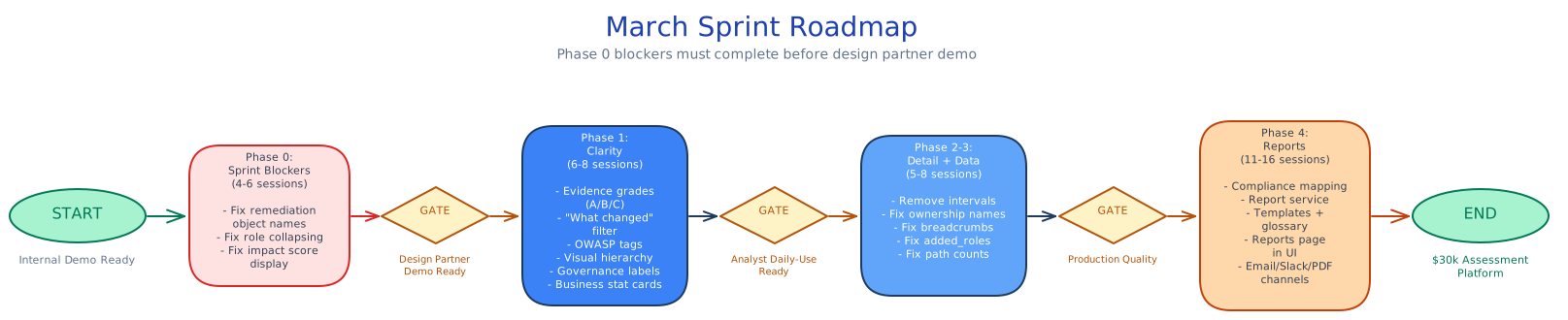
Sprint Roadmap
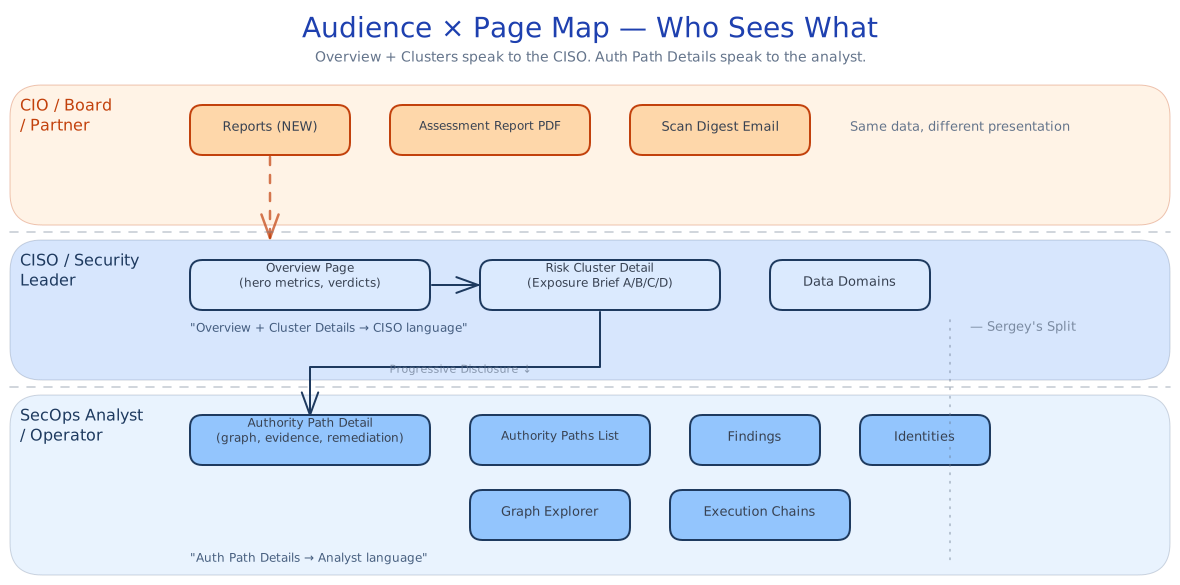
Who Sees What — Audience × Page Map
Phase 0 Blockers — Before / After
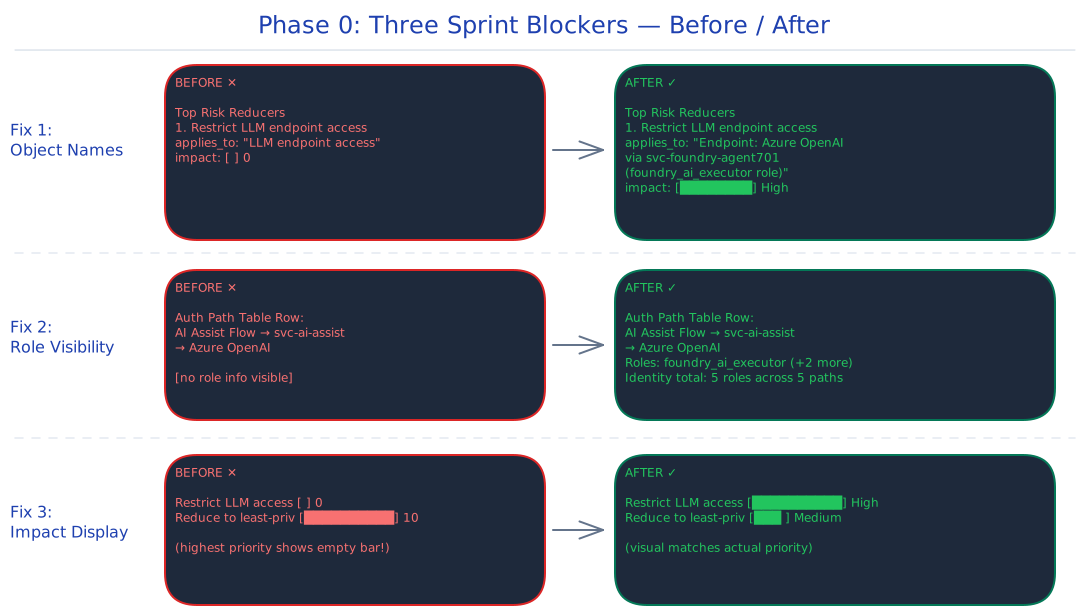
Phase 0: Sprint Blockers (Fix Before Design Partner Demo)
0.1 Remediation applies_to Must Name Specific Objects
Priority: P0 — Sergey flagged this explicitly Effort: Medium (2-3 sessions) Agents that flagged this: CISO, Product QA, SecOps
Current state: Remediation actions return generic applies_to values:
"LLM endpoint access"→ should be"Endpoint: Azure OpenAI Endpoint""execution path"→ should be"Role: ap_write, ar_write on Identity: svc-invoice-bot""egress path"→ should be"Connection: Billing_Payment_Methods (external)"
Root cause: The call site at src/api/routes/authority-paths.ts:108 invokes generatePathRemediation() without passing entityContext (the resolved entity/role display names from the path graph). Cluster-level remediation already passes this context, which is why cluster remediation has entity names but path-level does not.
Files to modify:
src/api/routes/authority-paths.ts:108— Primary fix. PassentityContext(path nodes, via_roles with display names) togeneratePathRemediation(). This is the call site that's missing the context.src/services/remediation-service.ts— Secondary reference. ThegeneratePathRemediation()method already acceptsentityContext— it just isn't receiving it from the route handler. Verify it uses the context to resolveapplies_tofields.src/evidence/remediation.ts— Evidence pack remediation also generatesapplies_toand may need the same fix.
Implementation:
- In
authority-paths.ts:108, constructentityContextfrom the authority path'snodesandvia_rolesarrays (display names already available from the path query) - Pass it to
generatePathRemediation()— the method already knows how to use it (see how cluster remediation works) - The UI already renders
action.applies_to— no frontend change needed
Acceptance criteria:
- Path remediation
applies_toincludes at least one named entity/role from the path - Cluster remediation
applies_toincludes identity count and example names - No generic terms like "execution path" or "egress path" remain
0.2 Authority Path Role Visibility (Collapsing Fix)
Priority: P0 — Sergey flagged this explicitly Effort: Low-Medium (1-2 sessions) Agents that flagged this: CISO, Product QA, UX
Current state: Authority path table rows show workload → identity → destination with no role information. Roles only visible on row expand. An identity with 5 roles across 5 paths appears identical to one with 1 role.
Files to modify:
ui/src/pages/RiskClusterDetailPage.tsx— Cluster detail paths tableui/src/pages/AuthorityPathsListPage.tsx— Authority paths list table (if exists as standalone)ui/src/components/PathRiskClusterCard.tsx— If path summary is shown on cards
Implementation:
- Add a "Roles" column or badge to the authority paths table rows showing
via_roles.lengthand first 2 role names:Roles: foundry_ai_executor (+2 more) - In the expanded row, add "Identity total roles" aggregation. Group all paths by identity ID, count distinct roles:
Total roles for svc-foundry-agent701: 5 roles across 5 paths - In Standing Authority panel, remove
slice(0, 2)truncation — show all roles or use a "show all" toggle.
Acceptance criteria:
- Authority path table row shows role count or first role name without expanding
- Expanded row shows identity's total role count across all paths
- Standing Authority panel shows all roles (not truncated to 2)
0.3 Fix Impact Score Display (Not Inversion — Semantic Mismatch)
Priority: P0 Effort: Low (1 session) Agents that flagged this: Product QA, SecOps
Current state: "Restrict LLM endpoint access" has impact_score: 0 (renders as empty bar). "Reduce to least-privilege" has impact_score: 10.
Root cause (clarified by API audit): The impact_score is actually a computeCategoryRank() value where 0 = highest priority (egress-resolving) and higher numbers = lower priority. The backend ranking is correct — the problem is the UI displays it as a progress bar where 0 = empty and 10 = full, inverting the visual meaning.
Files to modify:
ui/src/pages/AuthorityPathDetailPage.tsx:471-483—ImpactBarcomponent renders score as a direct percentage- Consider renaming the field in the API response from
impact_scoretopriority_rankfor clarity
Implementation:
- In
ImpactBar, invert the display: render(maxScore - score) / maxScore * 100as the bar width, so rank 0 (highest priority) shows a full bar - Or: convert to a label system ("High Impact" / "Medium" / "Low") instead of a bar, avoiding the numeric confusion entirely
- Add a tooltip explaining what the score means
Acceptance criteria:
- "Restrict LLM endpoint access" (rank 0) renders as the visually largest/most prominent action
- "Reduce to least-privilege" (rank 10) renders as less prominent than egress-resolving actions
- The visual meaning is unambiguous — no empty bars for high-priority actions
Phase 1: CISO Clarity (This Sprint)
1.1 Invert Visual Hierarchy on Cluster Cards
Effort: Low (CSS/layout)
Files: ui/src/components/PathRiskClusterCard.tsx
The verdict sentence ("3 autonomous identities accessed sensitive systems 681 times...") should be the dominant text element. The path count ("13 Paths") should be secondary. Currently inverted.
- Make verdict sentence
text-base font-medium(or larger) - Move path count to a smaller badge or secondary line
- Keep priority badge and domain tags
1.2 Add Evidence Grade Badges (A/B/C)
Effort: Low-Medium (component + conditional rendering)
Severity: CRITICAL (upgraded per review — all 5 agents independently called this the #1 missing differentiator)
Files: ui/src/components/ (new badge), ui/src/pages/AuthorityPathDetailPage.tsx, ui/src/pages/RiskClusterDetailPage.tsx
The platform's primary claim is "we show what DID execute, not what COULD." Without visible grades, this claim is unverifiable to the user. Data already exists:
- Grade A (Execution Confirmed):
execution_30d > 0 - Grade B (Temporal Correlation): has execution evidence but
execution_30d == 0recently - Grade C (Standing Authority Only):
execution_30d == 0, no execution evidence
Display as badge on: authority path table rows, path detail header, cluster card summary counts.
1.3 Add OWASP/Business Relevance Tags
Effort: Low (mapping table + badge)
Files: ui/src/lib/ (new mapping), finding/cluster components
Mapping from existing spec:
orphaned_ownership→ ASI03 (Identity & Privilege Abuse)scope_drift→ ASI10 (Rogue Agents)llm_egress→ ASI02 (Tool Misuse)reachability_drift→ ASI08 (Insufficient Control)
Render as small tags on cluster cards and finding detail pages.
1.4 Fix Governance Checklist Deduplication
Effort: Low (label mapping fix)
Files: ui/src/pages/RiskClusterDetailPage.tsx:119-169 (GovernanceChecklist)
Use distinct labels:
orphaned_ownership→ "Orphaned identities"unknown_identity_binding→ "Unbound identity"ownership_drift→ "Ownership decay"reachability_drift→ "Reachability expansion"scope_drift→ "Scope drift"
Also add path counts: "Scope drift (3 paths)" by counting finding occurrences.
1.5 Promote Highest-Risk Path in Cluster
Effort: Low (data already sorted)
Files: ui/src/pages/RiskClusterDetailPage.tsx Section A
Add a callout in Section A (What Happened): "Highest risk: Agent Ascribe_Summarizer → GP_Clinical_Notes (127 executions, orphaned, LLM egress)". Use the first authority path from the cluster (already sorted by risk).
1.6 Replace Secondary Stat Cards with Business Metrics
Effort: Low (data available in posture summary + clusters)
Files: ui/src/pages/OverviewPage.tsx
Replace "Active Autonomous: 5 Identities" / "Dormant Authority: 2" / "Autonomous: 7 Workloads" / "Operator-Assisted: 3" with:
- "Sensitive Domains Reached: 6"
- "Departed Owners Unresolved: 2"
- "LLM Endpoints Invoked: 3"
1.7 Add "What Changed Since Yesterday" Filter
Effort: Medium (API + UI)
Promoted from Phase 2 — SecOps analyst rated this the #1 daily workflow blocker. For the Deloitte managed services use case (ongoing operations, not just point-in-time assessments), this is demo-blocking.
Files: src/api/routes/findings.ts, ui/src/pages/OverviewPage.tsx or FindingsList.tsx
Add ?changed_since=<ISO8601> query parameter to findings endpoint. Filter by detected_at or updated_at. On Overview, add "New since last visit" section (store last-visit timestamp in localStorage).
Phase 2: Operator Clarity (This Sprint)
2.1 Remove Finding Intervals (was 2.2)
Effort: Low
Files: ui/src/pages/AuthorityPathDetailPage.tsx:360-380
Remove the intervals rendering block from FindingTile. Keep only the drift breakdown components.
2.3 Fix Ownership Section to Use Actual Names
Effort: Low
Files: ui/src/pages/AuthorityPathDetailPage.tsx:584-586
Replace hardcoded "Service principal owner departed" with owner_descriptions from the finding's evidence_refs: "Maria Lopez (departed)".
2.4 Fix Breadcrumbs
Effort: Low-Medium
Files: ui/src/components/Layout.tsx:59-64 (formatBreadcrumbSegment)
For authority path routes: display workload → destination chain. For cluster routes: display cluster label. For entity routes: display entity name. Use already-fetched page data.
Phase 3: Data Quality (This Sprint if Possible)
3.1 Fix added_roles Population in Evidence Packs
Effort: Medium
Files: src/evidence/ — scope drift evidence assembly
When baseline_role_count=0 and current_role_count=2, added_roles must contain the 2 role names. Currently returns empty array. Also fix evidence pack text "Review 0 role assignments" → should say "Review 2 role assignments".
3.2 Fix Posture Summary Path Count
Effort: Low-Medium
Files: src/services/risk-cluster-service.ts or posture aggregation
Posture summary says 32 paths (29 active + 3 dormant) but authority-paths list returns 30. Investigate discrepancy — likely removed paths being counted in posture but excluded from list.
3.3 Populate Execution Evidence target_resource
Effort: Medium-High (depends on connector data)
Files: src/ingestion/ or seed script
All execution evidence records have target_resource: "". If connector doesn't provide this, the seed script should populate it. If it should come from production connectors, document the gap.
Phase 4: Reports & Deliverables Service (Next Sprint — Strategic)
One report engine, many delivery channels. The platform UI is one of them.
Architecture:
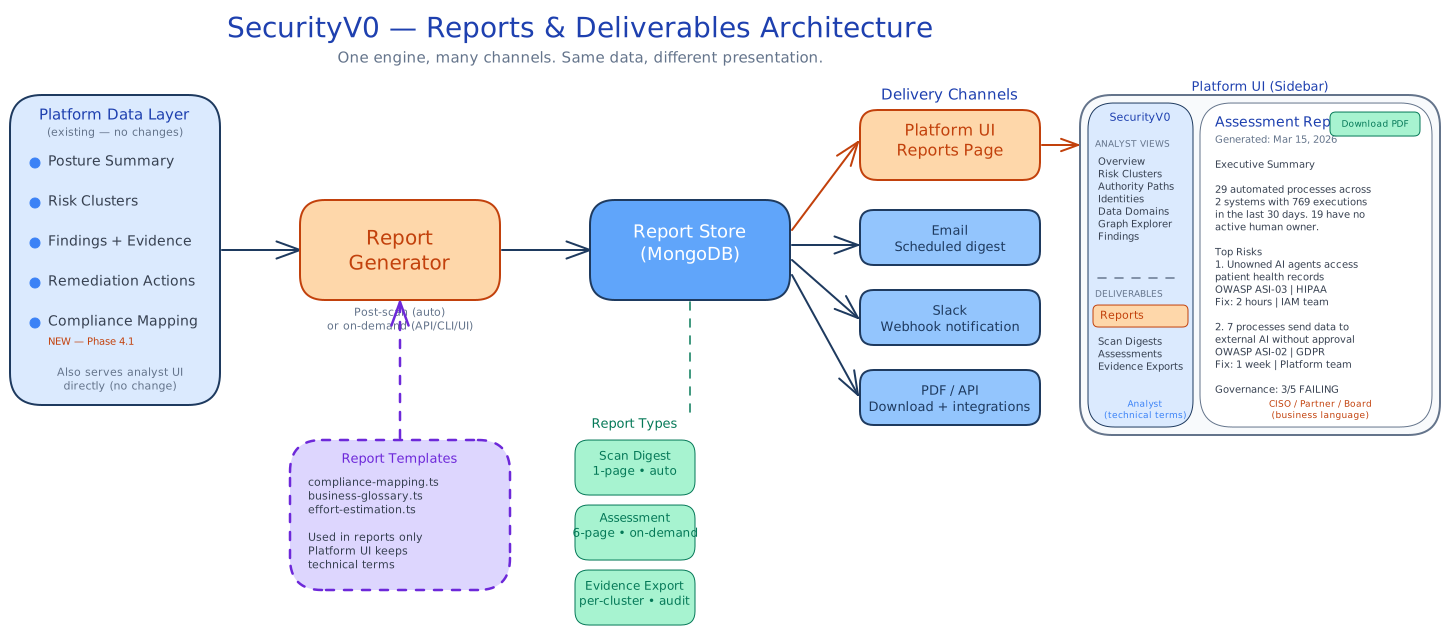
Reports are a backend service (src/services/report-service.ts) that generates structured report objects. These objects can be delivered through any channel — rendered as pages in the platform UI, sent as email/Slack digests, or exported as PDF. The report content is the same everywhere; only the presentation differs.
Report types:
| Report | Trigger | Audience | Length |
|---|---|---|---|
| Scan Digest | After each scan completes | Security leader, team leads | 1 page — key metrics, top 3 risks, trend |
| Assessment Report | On-demand or scheduled | CIO, board, partner clients | 6 pages — full executive summary with compliance mapping |
| Evidence Export | On-demand per cluster/path | Auditors, compliance teams | Variable — sealed evidence packs with integrity hashes |
All three share the same data layer (posture summary, clusters, findings, compliance mapping, remediation with effort estimates) and the same support libraries (business glossary, compliance mapping table, effort estimation).
See full strategy: Enterprise Executive Review v2
4.1 Add Compliance Mapping to Data Layer
Effort: 1-2 sessions Lives in: Platform API + UI (useful for ALL audiences — analysts, reports, exports)
Add compliance_references array to findings and clusters. Static deterministic mapping:
| Finding Type | OWASP ASI | NIST CSF | Regulatory |
|---|---|---|---|
orphaned_ownership | ASI03 (Identity & Privilege Abuse) | AC-2 (Account Management) | SOX: Segregation of duties |
scope_drift | ASI10 (Rogue Agents) | AC-6 (Least Privilege) | SOX: Change management |
llm_egress | ASI02 (Tool Misuse) | SC-7 (Boundary Protection) | HIPAA / GDPR |
reachability_drift | ASI08 (Insufficient Control) | AC-6 (Least Privilege) | SOX: Access control |
external_egress | ASI02 (Tool Misuse) | SC-7 (Boundary Protection) | GDPR: Data transfer |
Files: Create src/lib/compliance-mapping.ts. Inject into API responses. Render as tags in UI.
Source: sv0-documentation/docs/product/notion-synced/mapping-to-owasp-top-10-for-agentic-applications.md
This benefits analysts too — ticket justification, audit response, compliance reporting.
4.2 Build Report Service + Store
Effort: 3-4 sessions
Files: src/services/report-service.ts, src/storage/mongo/adapters/report-adapter.ts, src/api/routes/reports.ts
The core engine. Generates report objects and stores them in MongoDB (reports collection).
Report object structure:
interface ReportDoc {
  id: string;
  tenant_id: string;
  report_type: "scan_digest" | "assessment" | "evidence_export";
  generated_at: string;       // ISO8601
  scan_id?: string;           // links to the scan that triggered it
  title: string;              // "Assessment Report — March 2026"
  summary: string;            // 2-3 sentence executive summary
  content: ReportContent;     // structured sections (see below)
  format_versions: {          // pre-rendered for each channel
    markdown: string;
    html: string;
  };
  metadata: {
    finding_count: number;
    cluster_count: number;
    severity_distribution: Record<string, number>;
    compliance_frameworks: string[];
  };
}
API endpoints:
GET /api/v1/reports— list reports for tenant (paginated, filtered by type)GET /api/v1/reports/:id— get report detailGET /api/v1/reports/:id/pdf— download PDF renderPOST /api/v1/reports/generate— trigger on-demand generation
Generation: Can be triggered by:
- Post-scan worker (automatic after ingestion + evaluation completes)
- API call (on-demand from UI or partner integration)
- CLI script (for testing:
npx tsx scripts/generate-report.ts --tenant demo-w1 --type assessment)
4.3 Build Report Templates
Effort: 3-4 sessions
Scan Digest template:
- Executive summary (4-5 sentences, business language via glossary)
- Top 3 risks with compliance tags and effort estimates
- Governance status checklist (passing / failing / not assessed)
- Trend vs prior period (delta metrics)
- Link to platform for full details
Assessment Report template (6 pages):
- Cover page (tenant name, date, assessment period, branding placeholder)
- Executive summary (1 page, pure business language — no system names)
- Findings summary (table with compliance mapping, severity distribution)
- Risk detail per cluster (verdict sentences, compliance tags, domain impact)
- Remediation roadmap (business terms: effort, responsible role, complexity)
- Appendix: methodology, evidence integrity, data sources
Shared components:
src/lib/business-glossary.ts— "service principal" → "automated account", "egress" → "outbound data flow", etc. Used ONLY in report rendering, not in platform UI.src/lib/effort-estimation.ts— maps action categories to hours/days/weeks and responsible rolessrc/lib/compliance-mapping.ts— (from 4.1, shared with platform)
4.4 Platform Reports Page
Effort: 2-3 sessions
Files: ui/src/pages/ReportsPage.tsx, ui/src/pages/ReportDetailPage.tsx
New page in the platform sidebar: Reports
- List of generated reports (scan digests + assessments), sorted by date
- Each report is readable in-browser (rendered HTML) and downloadable as PDF
- Filter by report type, date range
- "Generate Report" button for on-demand assessment reports
- Report detail page renders the full HTML version with print-friendly styling
This gives every user access to the executive layer without leaving the platform. The CISO opens the app, clicks "Reports", reads the latest digest. The partner downloads the assessment PDF. The analyst stays in Authority Paths.
4.5 Delivery Channels
Effort: 2-3 sessions total (incremental, one channel at a time)
Wire the report service to delivery channels:
Email: Post-scan digest sent to configured recipients. Uses the markdown/HTML format version. Include "View in platform" and "Download PDF" links. Configuration in tenant settings or env vars.
Slack: Webhook posts a condensed digest (summary + top 3 risks + link). Uses Slack Block Kit for formatting. Configure webhook URL in tenant settings.
PDF: GET /api/v1/reports/:id/pdf renders the HTML version to PDF via puppeteer (headless Chromium, already available from Playwright dependency). Also accessible from the Reports page download button.
API: GET /api/v1/reports is the integration point for partners building their own delivery. They can pull reports programmatically and wrap them in their own branded templates.
Each channel is additive — build email first (highest partner value), then Slack, then others as needed.
Phase 5: Polish (Following Sprint)
5.1 Add Findings Summary Strip
Render meta.bySeverity and meta.byType as a distribution bar above the findings table.
5.2 Enable "Create Ticket" Button
Even a copy-to-clipboard of structured remediation brief unblocks the workflow.
5.3 Resolve Navigation Orphans
Add Exposures, Findings, Execution Chains to sidebar under "Analyst" section separator.
5.4 Remove Legacy Dashboard
Redirect /dashboard to /. Remove legacy terminology (RG1/RG2).
5.5 Add Posture Trend Chart
Show executions, paths, orphaned count over 90 days using posture_snapshots collection.
5.6 Deduplicate Cluster-Level Remediation
When same action appears in 3 clusters, show once with "Applies across 3 clusters".
5.7 Standardize Ownership Terminology
Pick one term per state: "orphaned" → "No active owner", "invalid" → remove, "degraded" → consolidate with drift.
Effort Summary
| Phase | Items | Total Effort | Sprint Fit |
|---|---|---|---|
| Phase 0: Demo Blockers | 3 items (object names, role collapsing, impact display) | 4-6 sessions | MUST this sprint |
| Phase 1: Platform Clarity | 6 items (visual hierarchy, evidence grades, OWASP tags, governance, stat cards, "what changed") | 6-8 sessions | SHOULD this sprint |
| Phase 1 + 4.1: Compliance Mapping | 1 item — add compliance_references to data layer | 1-2 sessions | SHOULD this sprint (benefits analysts + reports) |
| Phase 2: Operator Detail | 3 items (intervals, ownership names, breadcrumbs) | 2-3 sessions | SHOULD this sprint |
| Phase 3: Data Quality | 3 items (added_roles, path counts, execution evidence) | 3-5 sessions | CAN this sprint |
| Phase 4.2-4.5: Report Service | 4 items (service + store, templates, Reports page, delivery channels) | 9-14 sessions | Next sprint — full project |
| Phase 5: Polish | 7 items | 6-10 sessions | Following sprint |
Parallel backlog (separate track): Security hardening — JWT signature verification, tenant header validation, diagnostics endpoint. Tracked at sv0-platform#82. Fix before any auth-enabled deployment, but does not block the demo/clarity sprint work.
Critical path for platform: Phase 0 (blockers) → Phase 1 (clarity) → Phase 2 (detail). Moves from "internal demo" → "design partner demo."
Critical path for partner enablement: Phase 4.1 compliance mapping (this sprint) → Phase 4.2-4.3 MVP report generator (next sprint, start with CLI script, validate template with Deloitte before building full service) → Phase 4.4-4.5 Reports page + delivery channels (after template validated). Use Playwright/Chromium (already available) for PDF rendering — no new dependency needed.
Pending product decision: Delta badges on Overview KPI cards — UX says remove (per Feb 22 spec), CISO says keep. Needs Sergey's call before acting. Currently counted as "contested" in progress tracking, not "closed."
Decision for Sergey: Which critical path is the constraint given the Deloitte timeline — platform demo readiness or partner assessment deliverable? This determines whether 4.1 compliance mapping gets pulled into this sprint (recommended) or waits.